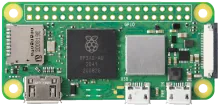
Raspberry Pi Zero 2

Raspberry Pi Zero 2

Device notes

Best for

Compact retro projects, tiny cabinets, and low-power travel kits.

Notes

  • Use a powered USB hub for multiple controllers.
  • Wi-Fi setup is easiest with a preconfigured config file.

Known issues

  • Limited USB ports without an adapter.
  • Performance is best suited for classic systems.

Installation

  1. Download. Get the latest Raspberry Pi Zero 2 image from the downloads page or the wiki.
  2. Flash. Write the image to an SD card or SSD using balenaEtcher, Raspberry Pi Imager, or dd.
  3. Boot. Insert the media, power on. REG Linux expands the filesystem on first boot. Pair your controllers when prompted.
  4. Rescue. If something goes wrong, reboot into rescue mode — your games are always safe on a separate partition.
Browse all devices Compatibility matrix